Examples · examples/ring-mouse/v0.5
Signet
A mouse you wear as a ring
Eight small boards sit on the faces of an octagonal ring round the index finger, each soldered to the next along its edge. Turn the ring's crown toward the thumb: the ring turns with the hand and the cursor follows its gyroscope; the thumb slides along the scroll strip to scroll, and presses the clicks tile for the left and the right button. The ring talks Bluetooth LE to the computer as an ordinary HID mouse and charges on a post through 2 pads inside it.
- v0.5
- 8 boards
- GREEN on all 8 boards
Drag to turn the board. KiCad's render of it, 36 views, 10 degrees apart.
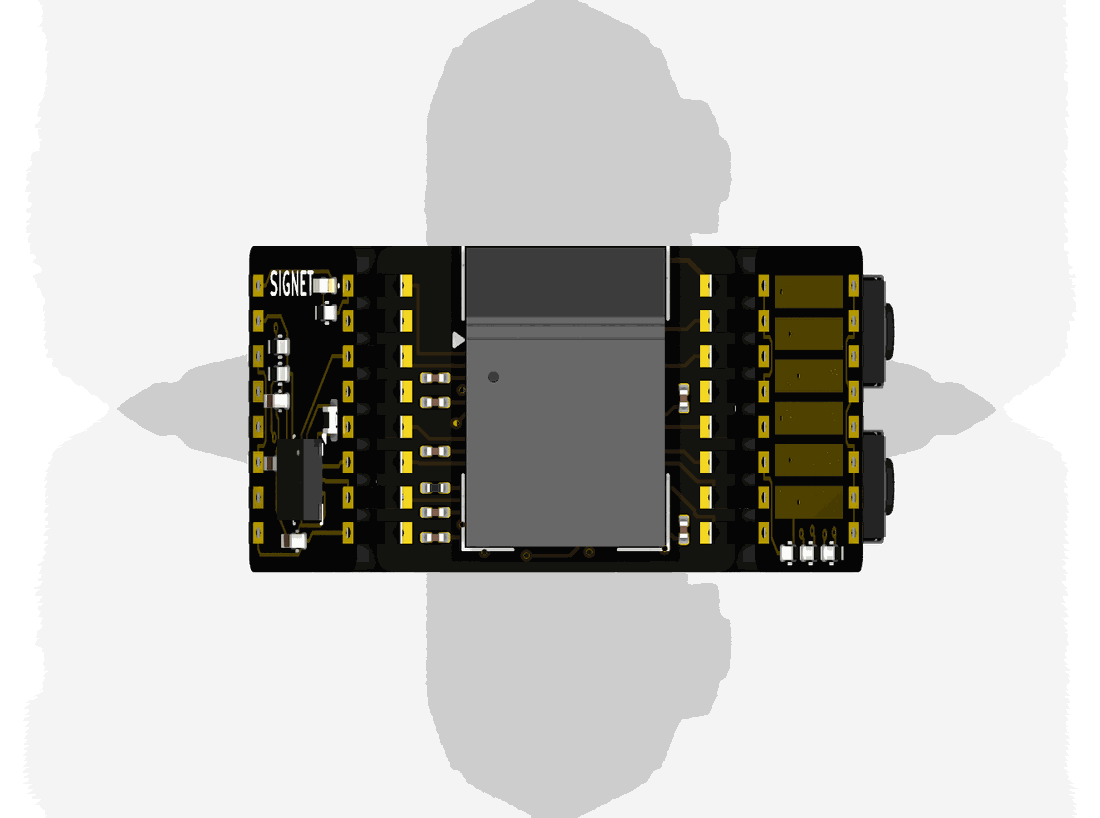
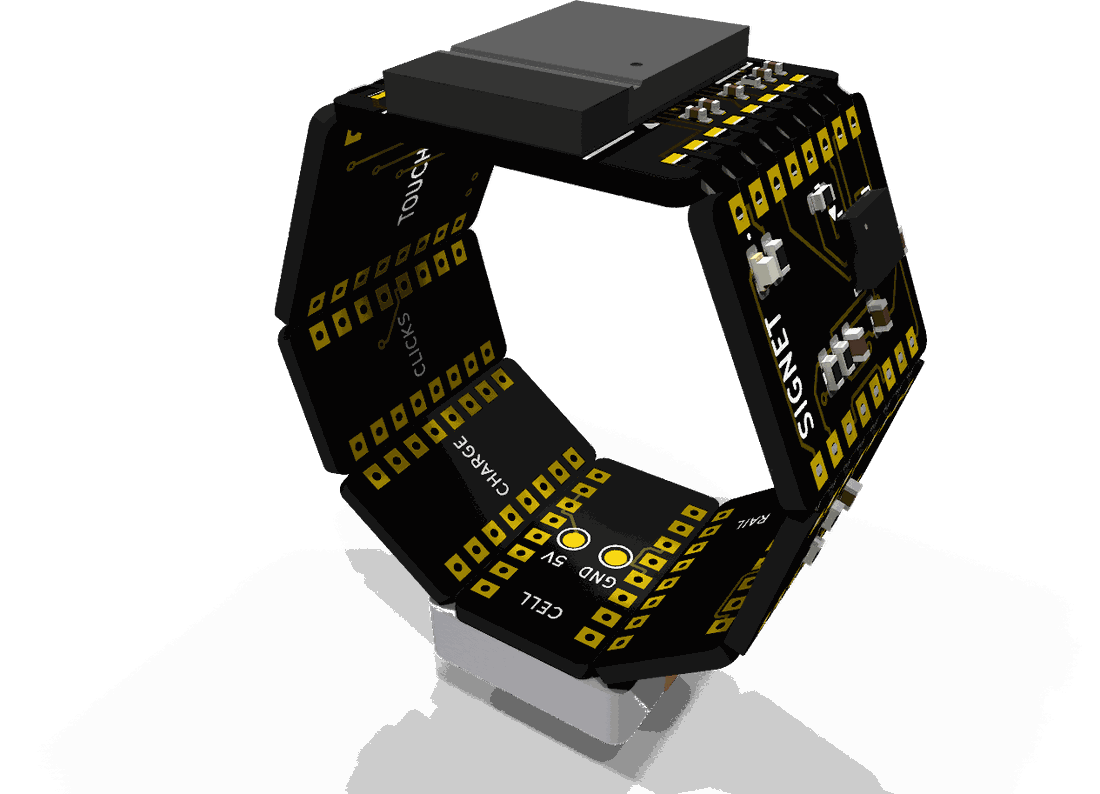
The boards, track by track
Every track and part of the routed boards, drawn from their files
Signet is eight boards, each in a folder of its own. You can pick a board, point at a pad to see its part, and click a track, a via or a pad to follow its connection across the board.
examples/ring-mouse/v0.5/radio/signet_radio.kicad_pcb: four copper layers, 16 parts, 134 track segments, 18 vias and 19 nets, 13.2 × 12 mm.
You can drag to move around, and pinch or hold Ctrl and scroll to zoom.
examples/ring-mouse/v0.5/touch/signet_touch.kicad_pcb: four copper layers, 6 parts, 68 track segments, 10 vias and nine nets, 10 × 12 mm.
You can drag to move around, and pinch or hold Ctrl and scroll to zoom.
examples/ring-mouse/v0.5/clicks/signet_clicks.kicad_pcb: four copper layers, 4 parts, 52 track segments, one vias and three nets, 6.8 × 12 mm.
You can drag to move around, and pinch or hold Ctrl and scroll to zoom.
examples/ring-mouse/v0.5/charge/signet_charge.kicad_pcb: four copper layers, 8 parts, 75 track segments, no vias and six nets, 6.8 × 12 mm.
You can drag to move around, and pinch or hold Ctrl and scroll to zoom.
examples/ring-mouse/v0.5/cell/signet_cell.kicad_pcb: four copper layers, 6 parts, 37 track segments, no vias and four nets, 6.8 × 12 mm.
You can drag to move around, and pinch or hold Ctrl and scroll to zoom.
examples/ring-mouse/v0.5/rail/signet_rail.kicad_pcb: four copper layers, 5 parts, 54 track segments, no vias and four nets, 6.8 × 12 mm.
You can drag to move around, and pinch or hold Ctrl and scroll to zoom.
examples/ring-mouse/v0.5/gauge/signet_gauge.kicad_pcb: four copper layers, 5 parts, 39 track segments, no vias and five nets, 6.8 × 12 mm.
You can drag to move around, and pinch or hold Ctrl and scroll to zoom.
examples/ring-mouse/v0.5/motion/signet_motion.kicad_pcb: four copper layers, 11 parts, 124 track segments, three vias and 10 nets, 10 × 12 mm.
You can drag to move around, and pinch or hold Ctrl and scroll to zoom.
Checks
The four checks on Signet v0.5
The verdict of the last run, as its gates report records it: GREEN on all 8 boards.
- signet_radioGREEN with 2 warnings (nothing to run for: sim)
- signet_touchGREEN (nothing to run for: sim)
- signet_clicksGREEN (nothing to run for: sim)
- signet_chargeGREEN (nothing to run for: sim)
- signet_cellGREEN (nothing to run for: sim)
- signet_railGREEN (nothing to run for: sim)
- signet_gaugeGREEN
- signet_motionGREEN (nothing to run for: sim)
How it was built
Every step of the design, with what it changed
Each step as the README's "What changed" sections (v0.5/README.md) records it, oldest first.
The first ring
Black faces, solder in the joints, the cursor
The first pass of the loop (
../LOOP.md) judged v0.1 against its checklist.A light the wearer sees, a guard on the charging pads, room between the joint pads
The second pass of the loop (
../LOOP.md) judged v0.2 against its checklist.A ring that closes
The third pass of the loop (
../LOOP.md) judged v0.3 against its checklist, and measured the assembly against the boards' own geometry.8 sections, a smoother ring
The owner asked for more sections, so that the ring reads smoother.
What is open
What's still left to do on this board
- The cell's pouch reaches 1.6 mm past its tile, over the 2 joints beside it. A cell 6 to 7 mm wide, or one curved to the ring, would sit within it; its capacity and its maker are open.
- The radio's corners still turn 66.9 degrees, against 37.7 at the others: the module sets them. A smaller module, or one with its antenna along its short side, would let the radio narrow.
- The clicks tile has no room left for its L and R marks.
- The ring is 12 mm wide all round. Tiles narrower on the palm's side would sit better between the fingers; the joints there would then be shorter than 8 pads at 1.3 mm.
- The cell holds about 20 mAh. The ring's draw while connected is not measured, so its hours of use are not known.
- No deck holds the touch strip's charge transfer: the TSC's pulse times are in ST's reference manual, which was not read in this session.
- The LSM6DSL's axes in its package (
AIR_CHIP_X,_Y,_Zinfirmware/src/air.h): from its datasheet's axis figure, not read in this session; check with the ring turned by hand. - ST's datasheet (DS13252) was not read: check the supply pins' hookup and decoupling, and the RF_OUT to ANT_IN link, against it before an order. Since v0.5 the 4.7u bulk capacitor sits on the motion tile, across J1, about 4 mm from the supply pins: check that against the datasheet's layout advice too.
Four more in its README.